Circuits
Circuit class in palgds is used for creating automated layouts of complex photonic circuits.
The designer provides the individidual components and the links between their ports. The optical or
electrical routes automatically generated in Circuit class.
Circuit Layout 1: Basics
In this section, we will create a simple circuit with a ring resonator and grating couplers. For this, we will use the same ring
resonator definition that we used in previous section. The same PCell definition of ring resonator also exists
in the pcell_library of palgds. Therefore, let’s start with following imports:
import gdstk
import numpy as np
import palgds.base_cells as bc
from palgds.pcell_library import RingResonator
from palgds.circuit import Circuit
Then, create ring_res object:
ring_res = RingResonator(name="RingRes", radius=10, gap=0.2, width=0.45)
We will create grating coupler cell by reading an existing GDS file. Make sure you download and put “GC.gds” file into your working directory. Here, we are manually providing the port of the grating coupler.
gc = bc.GDSCell(name="GC", filename='GC.gds', ports={"in": bc.Port((1, 0), 0, "op")})
Now, we will create the circuit using these components. Here, pcells is the dict of cells that compose the circuit. translation (default: (0, 0)) and
rotation (default: 0 in radians) are transformations of individual components. Connections between ports are provided
with links. Waveguide routes between the connected ports will be created with default trace with 450 nm wide waveguides.
ring_res_circuit = Circuit(name='RingResCircuit',
                  pcells={"rr": ring_res, "gc1": gc, "gc2": gc},
                  translations={"rr": (0, 0),
                                "gc1": (-15, 0),
                                "gc2": (15, 0),
                                },
                  rotations={"gc2": np.pi},
                  links=[{"from": ("rr", "in"), "to": ("gc1", "in")},
                         {"from": ("rr", "out"), "to": ("gc2", "in")},
                         ]
                  )
Then, export layout:
lib = gdstk.Library()
lib.add(ring_res_circuit , *ring_res_circuit.dependencies(True))
lib.write_gds("RingResCircuit.gds", max_points=4000)

Circuit Layout 2: Advanced
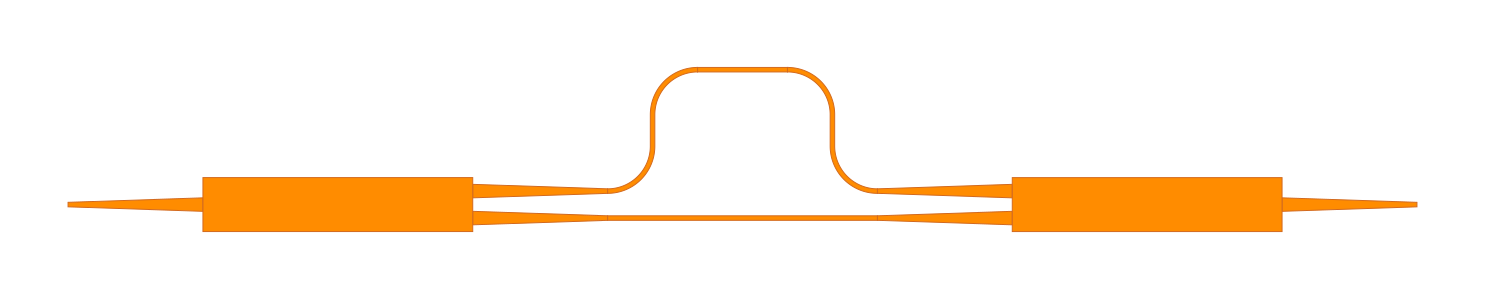
In this section, we will build the layout of an unbalanced Mach-Zehnder interferometer (MZI) circuit.
We will use an existing MMI as a coupler and also create a custom Trace to be
used as routing template in the circuit.
Make sure you download and put “MMI.gds” file into your working directory. This is a one-input two-output coupler. In this case, we will not manually set the ports of MMI, instead we will read the ports from a text file. Therefore, also make sure you downdload “MMI.txt” file to working directory. Start with following imports and create MMI coupler:
import gdstk
import numpy as np
import palgds.base_cells as bc
from palgds.circuit import Circuit


mmi = bc.GDSCell(name="MMI", filename='MMI.gds', ports_filename="MMI.txt")

This MMI coupler has output waveguides with width of 500 nm. However, default waveguide trace in palgds is a 450 nm wide
waveguide with a layer number of ‘0’. Therefore, we need to create a custom trace template compatible with MMI outputs:
class CustomTrace(bc.Trace):

    def __init__(self, name, points, bend_radius=5):
        super().__init__(name, points, width=[0.5], bend_radius=bend_radius,
                         layer=[0], datatype=[0], port_type='op')
Let’s create a straight waveguide layout with this trace.
straight_wg = CustomTrace(name='Trace', points=[(0, 0), (10, 0)])

Let’s start building MZI circuit. First, place two MMIs and straight waveguide cells without connecting them.
mzi_no_routes = Circuit(name='MZI_no_routes',
                        pcells={"mmi1": mmi, "mmi2": mmi, "wg":straight_wg},
                        translations={"mmi1": (0, 0),
                                      "mmi2": (90, 0),
                                      "wg": (40, 15)
                                      },
                        rotations={"mmi2":np.pi},
                        reflections={"mmi2":True},
                        )
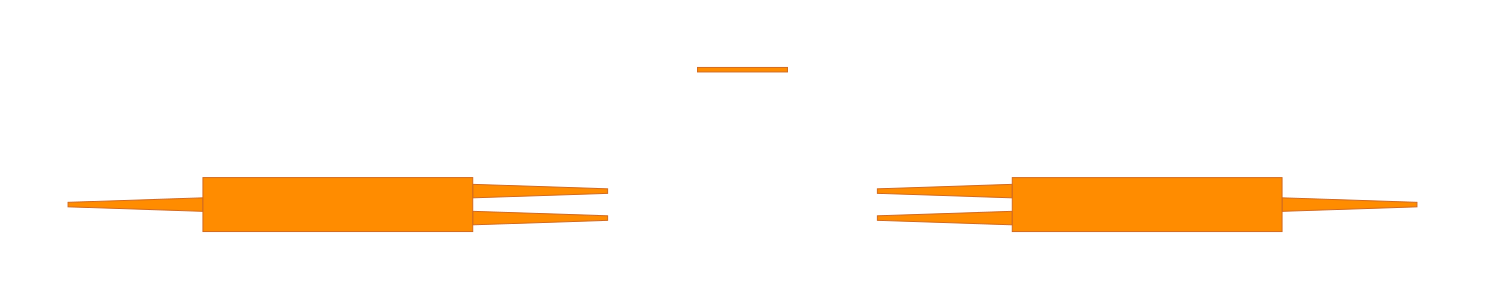
Here, we rotated the second MMI by 180 degrees and took its x-reflection to align its first output port to be at the top.
Now, we will add links of this circuit. Links will create the automated routes between ports. Be aware, since the our trace is now 500 nm
wide, we also need to pass the CustomTrace as the optical trace (op_trace) argument to the Circuit class.
mzi = Circuit(name='MZI',
              pcells={"mmi1": mmi, "mmi2": mmi, "wg":straight_wg},
              translations={"mmi1": (0, 0),
                            "mmi2": (90, 0),
                            "wg": (40, 15)
                            },
              rotations={"mmi2":np.pi},
              reflections={"mmi2":True},
              links=[{"from": ("mmi1", "out1"), "to": ("wg", "in")},
                     {"from": ("wg", "out"), "to": ("mmi2", "out1")},
                     {"from": ("mmi1", "out2"), "to": ("mmi2", "out2")},
                     ],
              op_trace=CustomTrace
              )