PCells
What is a PCell
PCell stands for parametric cell, a well-known concept in layout design for the dynamical creation of devices. A PCell is a piece of code where the designer can create geometric primitives by adjusting the design parameters.
A PCell in palgds is based on gdstk.Cell class. A cell is a fundamental structure in the layout.
It is composed of basic geometrical elements (polygons and paths) and references to other cells. For more information
see GDSTK library. We suggest you learn the basics of GDSTK library (Cell, Library, Polygons, Paths, References)
before going further.
A PCell is a class that inherits from the gdstk.Cell class, and it extends the functionality of
gdstk.Cell to be used as a parametric cell. In addition, a PCell also has ports attribute that stores the
properties of the inputs and outputs of a PCell.
Creating PCells
In this section, we will create a parametric RingResonator class to explain how a PCell works.
Start your code with following imports:
import gdstk
import numpy as np
import palgds.base_cells as bc
Every class that you create for building layout should inherit from PCell class. In the __init__() method,
you can include many parameters that you can adjust while creating a ring resonator. Using these parameters, you can
create the geometric layout elements. These geometric elements will be a ring and a bus waveguide in a basic ring
resonator. See the following code:
class RingResonator(bc.PCell):
    def __init__(self, name, radius, gap, width, layer=0, datatype=0):
        super().__init__(name)
        self._create_elements(radius, gap, width, layer, datatype)
        self._create_ports(radius)

    def _create_elements(self, radius, gap, width, layer, datatype):
        center = (0, radius+gap+width)
        ring = gdstk.ellipse(center, radius+width/2, radius-width/2, layer=layer, datatype=datatype, tolerance=2e-4)
        straight_waveguide = gdstk.rectangle((-radius, -width/2), (radius, width/2), layer=layer, datatype=datatype)
        self.add(ring, straight_waveguide)

    def _create_ports(self, radius):
        self.ports.update({"in": bc.Port((-radius, 0), np.pi, "op"),
                           "out": bc.Port((radius, 0), 0, "op"),})
After creating RingResonator class, we can create an instance of it. Thanks to the parametric implementation,
we can easily create variants of ring resonators. Let’s create a ring resonator object with
radius of 5 \(\mu m\), coupling gap of 0.2 \(\mu m\), and line-width of 0.45 \(\mu m\):
ring_res = RingResonator(name="RingRes", radius=5, gap=0.2, width=0.45)
ring_res.write_svg("RingRes.svg")
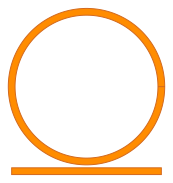
You can export the GDSII layout using a library:
lib = gdstk.Library()
lib.add(ring_res, *ring_res.dependencies(True))
lib.write_gds("RingRes.gds", max_points=4000)
Here, we created the elements of the RingResonator in _create_elements method.
The elements, ring and bus waveguide, are created using gdstk.ellipse and gdstk.rectangle functions
by providing appropriate parameters.
ports is created in _create_ports method. ports is a python dict that stores the port objects.
Every port is an instance of Port class containing the properties of the port.
The ports in a pcell are defined in the following way:
Ports definition: {name1: Port(position, angle, port_type), name2: ... }
name is the name of the port, position is a tuple of two numbers (x, y), angle is the orientation of the
port in radians, and port_type is the type of the port: either "op" for optical ports or "el"
for electrical ports.
Currently, we will not use the ports but they will be very important when creating circuits from PCells. Finally,
let’s display the string representations of ring_res object and its ports:
>>> print(ring_res)
PCell <RingResonator> name:'RingRes' with 2 ports, 2 polygons, 0 paths, 0 references, and 0 labels

>>> print(ring_res.ports)
{'in': Port(position=(-5.000, 0.000), angle=3.142, port_type=op),
 'out': Port(position=(5.000, 0.000), angle=0.000, port_type=op)}