PDK
Every foundry has its process design kit (PDK), which includes technology data, rules & guidelines, primitive components, verification files, etc. The designers follow these rules while creating designs for the successful fabrication of their structures in that foundry.
Creating a PDK
This section will cover a simple PDK template for palgds to guide you on the PDK you want to create. Download sample_pdk folder
from the repository and put this folder to your working directory. It is a package which includes technology.py and
components.py files, and a gds folder containing gds files of primitive components.
The technology.py file contains the trace templates for optical/electical routes or some layer and dimensional specifications etc. Such as:
class WaveguideTrace(bc.Trace):
"""Trace template for optical routes"""

def __init__(self, name, points, bend_radius=5):
    super().__init__(name, points, width=[0.45, 2.45], bend_radius=bend_radius, layer=[0, 1], datatype=[0, 0], port_type='op')
.
.
.
TECH.LAYER.CORE = (0, 0)
TECH.DIMENSION.BEND_RADIUS = 5
The components.py file contains the PCell definitions of primitive foundry cells. Usually, these PCells are created from provided gds files. Such as:
import os
import palgds.base_cells as bc

gds_path = os.path.join(os.path.dirname(__file__), "gds\\")
class YBranch(bc.GDSCell):
    """"""
    def __init__(self):
        super().__init__(name="YBranch", filename=gds_path+'YBranch.gds', ports_filename=gds_path+"YBranch.txt")
Using a PDK
In this section, we will use sample PDK in a layout. Import the technology first. Even if you will not use it, importing technology will change the default parameters such as trace template for circuit routes.
from sample_pdk import technology
import sample_pdk.components as cs
from palgds.circuit import Circuit
Create a YBranch from components of PDK:
ybranch = cs.YBranch()
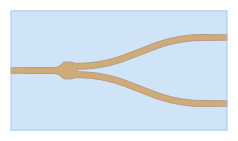
Now, let’s create a 1x4 splitter using YBranchs:
splitter = Circuit(name='Splitter',
              pcells={"ybranch1": ybranch, "ybranch2": ybranch, "ybranch3":ybranch},
              translations={"ybranch1": (0, 0),
                            "ybranch2": (30, 15),
                            "ybranch3": (30, -15)
                            },
              links=[{"from": ("ybranch1", "out1"), "to": ("ybranch2", "in")},
                     {"from": ("ybranch1", "out2"), "to": ("ybranch3", "in")},
                     ],
              )
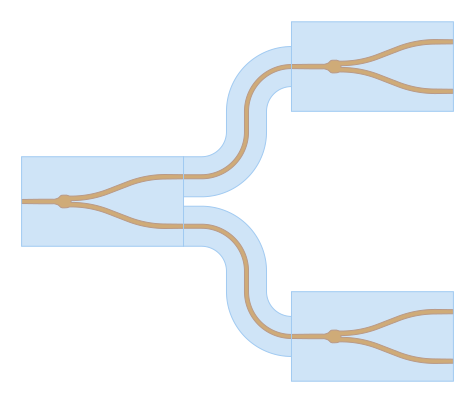
We see an important thing about importing technology file of the PDK: Even if we did not specify anything in the Circuit class,
the routes between the components are created with the default waveguide/optical trace of the PDK. Here, default waveguide trace
is composed of 0.45 um wide core layer surrounded by 4.45 um wide cladding layer.