Quick Layout
In this section, we will create a simple circuit layout with a directional coupler and grating couplers. We will first create
individual component cells and then create circuit by connecting these components.
We will use parametric cell definition of directional coupler existing
in pcell_library in palgds to keep tutorial short.
Let’s start by importing following packages:
import gdstk
import numpy as np
import palgds.base_cells as bc
from palgds.circuit import Circuit
from palgds.pcell_library import DirectionalCoupler
Now, let’s create a directional coupler cell with 0.45 um wide waveguides, 10 um coupling length, 8 um S-bend length, 0.2 um gap, and y-span of 4 um.
dc = DirectionalCoupler(name="DC", Lc=10, width=0.45, Ls=8, y_span=4, layer=0, datatype=0)
For visualization, you can export to svg by using write_svg function.
dc.write_svg("DC.svg")

We will grating coupler PCell by reading an existing GDS file. Make sure you download and put “GC.gds” file into your working directory. Here, we are manually providing the port of the grating coupler.
gc = bc.GDSCell(name="GC", filename='GC.gds', ports={"in": bc.Port((1, 0), 0, "op")})
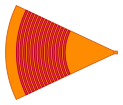
Now, we will create the circuit using these components. Here, pcells is the dict of cells that compose the circuit. translation (default: (0, 0)) and
rotation (default: 0 in radians) are transformations of individual components. Connections between ports are provided
with links.
dc_circuit = Circuit(name='DC_Circuit',
                  pcells={"dc": dc, "gc1": gc, "gc2": gc, "gc3": gc, "gc4": gc},
                  translations={"dc": (0, 0),
                                "gc1": (-15, 15),
                                "gc2": (-15, -15),
                                "gc3": (40, 15),
                                "gc4": (40, -15),
                                },
                  rotations={"gc3": np.pi, "gc4": np.pi},
                  links=[{"from": ("dc", "in1"), "to": ("gc1", "in")},
                         {"from": ("dc", "in2"), "to": ("gc2", "in")},
                         {"from": ("dc", "out1"), "to": ("gc3", "in")},
                         {"from": ("dc", "out2"), "to": ("gc4", "in")},
                         ]
                  )
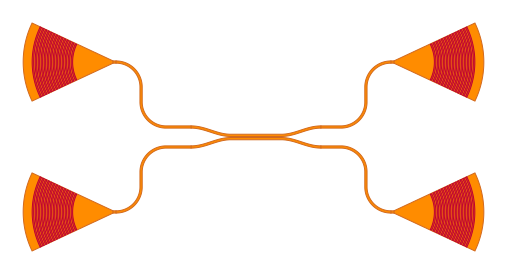
In order to export to GDSII file, we need to create a gdstk.Library and then add dc_circuit cell to it:
lib = gdstk.Library()
lib.add(dc_circuit, *dc_circuit.dependencies(True))
lib.write_gds("DC_Circuit.gds", max_points=4000)